

Using analytical tools like GA4 shows us where people click, bounce and convert, and behavioural tools like Clarity lets us watch where they hesitate, rage click or give up altogether. The trouble is, all that data tells us what people do specifically, not why they’re doing it.
A drop-off at checkout flags a problem. It won't tell you whether someone was confused by the wording, worried about handing over their card details or simply couldn't find the breakdown of the costs. Without the why, we build A/B tests on awareness of an issue, it can be based on assumptions rather than noting what users actually need.
That’s where user testing comes in. Watching real people use a website, and hearing what they think as they go, helps you understand what they expect, what frustrates them and where they get stuck.
There are two main ways to do user testing: moderated and unmoderated testing. You may be thinking one is better than the other, but they answer different questions. So we'll look at what each one is, when to use it, how they work together, and why, in an age of AI and automation, the human side of research matters more than ever.
What is Moderated User Testing?
In a moderated session, there's a researcher that guides a participant through a set of tasks in real time, either in person or over a video call. They watch what the participant does, listen to what they say and ask follow-up questions as things happen. It's a conversation, a back and forth session.
Its biggest strength is the human detail. People give a lot away without saying a word: a pause, a frown, a shrug, a change in tone, eyes darting around the page. This is where the ‘moderating’ comes into play, the moderator can notice those moments and this is where the real insights come from. Human behaviour is unpredictable, and a moderator who’s there in the moment can spot those reactions, ask about them and spot things a screen recording alone might not explain.
Imagine you're reviewing Clarity recordings of a new checkout. In one session, a user reaches the payment page, hovers between two options, scrolls up and down, then leaves. You can see what happened. You can't see why.
So a/b test idea; you look at testing, rewording the options to make them more digestible or making one the default or show ‘most popular’.
In a moderated session, you can simply ask: "What's going through your mind right now?" or "What are you looking for on this page?"
The answer might not be what you expect. They might have wanted reassurance that the payment was secure, or been unsure about the refund policy. The information they needed might have been on the page the whole time, just too small to notice. Or they might have been booking on their partner’s card and wanted to check with them first.
That last one isn’t a usability problem, and no dashboard would ever flag it. But it could spark a valuable test idea: a “save for later” or “share this booking” option, so couples and friends can come back and decide together.
That’s the value of moderated testing. It picks up the obvious issues, but also the little things from everyday life that nobody thinks to design for. Those nuances are often where the most unexpected conversion wins are hiding and where as a company you can stand out compared to your competitors, coming up with features no-one is doing.
To sum up, moderated testing is a great tool when you’re stuck: when the site looks good but conversion isn’t, or when you’re worried users won’t understand a new feature, or when the same friction keeps showing up and the obvious A/B tests aren’t fixing it.
When to use moderated testing
- When you need to understand why something is happening: Analytics show where people drop off, and then with moderated testing it can help explain the reason why. It's most useful when you can see a problem in the data and can't figure out the issue.
- When you're exploring something new: Early concepts, wireframes and rough prototypes raise more questions than answers. A company is aware of the purpose of the new features. But you might need to check if it will solve the problem? Is it obvious what is aiding? This is where a moderator can come in and get participants using this design and explore these questions openly, before time and budget go into building it.
- When the journey is complex or high-stakes: We are all aware our attention spans aren’t great these days, so multi-step bookings, unfamiliar terminology, financial decisions or sensitive personal information all need more than a completion check . So a moderator can explore how participants interpret the language, each step and each decision, and spot where their expectations differ from what the team intended. That’s how you make sure a journey isn’t just usable, but easy to understand for someone seeing it for the first time and or would come back to the site.
- When you need to challenge your own assumptions: The longer you work on something, the more obvious it feels. As a designer, I know how easy it is to forget that what's familiar to me is brand new to the user. You know what every button does and why every label was chosen. Users don't always. Moderated research lets you see the experience through fresh eyes, and sometimes the biggest finding is that people understand something completely differently from how you intended.
Moderated testing it isn’t just asking questions. It's looking at body language, knowing when to probe, when to stay quiet and how to ask without leading, even have general conversation with the participant. In addition, understanding signals e.g. pause might mean confusion or distrust or boredom. Also, the aim is to understand what the participant experiences, not to confirm what you already suspect.
What is unmoderated user testing?
In unmoderated testing, participants complete tasks on their own, in their own time, with no researcher present. Therefore you’ll use a testing platform that records their screen and, usually, their voice as they think aloud. You can then review the recordings, task results and any written answers afterwards. You can often get results from 20 or more people within a day or two.
So imagine you've redesigned the whole navigation of your site. You can set up an unmoderated user test to ask participants to find the multiple different items, and add them to their basket. If several people can’t find a certain item, or keep tapping an image that doesn't respond, you've found a pattern worth fixing.
When to use unmoderated testing
- To spot patterns across participants: If you have a clear research question, unmoderated testing shows how consistently people complete a task. That helps you tell a one-off struggle from a recurring usability issue.
- To validate a design decision: You’ve simplified the navigation, unmoderated testing shows whether the change does what it's meant to. It works best on higher-fidelity designs, where tasks are specific and need little explanation.
- When you need feedback quickly: Unmoderated testing is scheduled for you on platform, participants can take part from anywhere, at any time. That makes it easier to reach a wider audience and compare design options within a tight timeframe.
- To see how people behave on their own: With no moderator in the room, there's less pressure to perform. You see how people find their way through an experience without help, which makes it ideal for testing discoverability and more real first impressions.
Unmoderated testing needs as much planning beforehand as moderated, maybe even more, as instructions need to be clear and tasks realistic. As you’re not in the room to explain further, a poorly worded task can send every participant down the wrong path. So a good idea is to trial the test with one or two people first: to catch and alter a confusing instruction. Simple is key. Also remember to have a good feedback form to make sure you get as much insights as possible from your participants after the task is completed.
Using moderated and unmoderated testing
If I’m honest, they work best together. An unmoderated test might show you that loads of people are getting stuck in the same place. A few moderated sessions can then help you figure out why. And once you’ve made a change, either one can tell you whether it actually helped.
Example: Gym membership class booking drop off
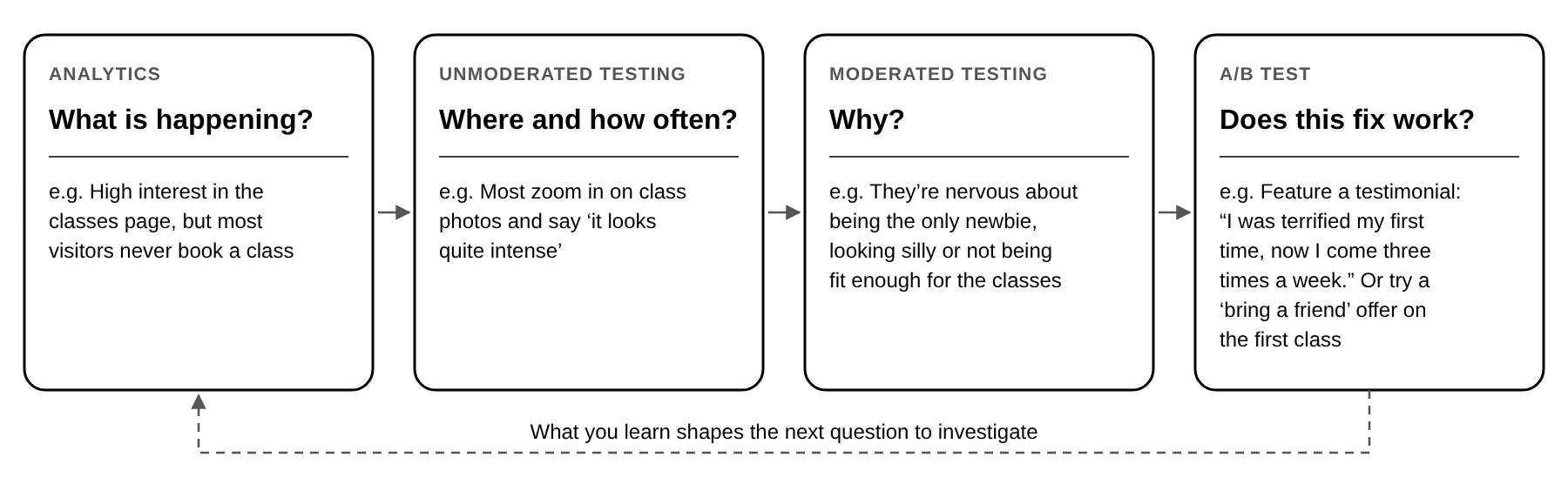
It doesn’t always go in that order. Sometimes a quick unmoderated test spots the issue first and moderated sessions explain it, and other times it’s the other way round. The key is choosing the method that answers the question you have right now. As insight from real participants can turn your initial guesses into a backed up hypothesis, so the A/B tests you run are based on what users actually need.
The key takeaways
GA4, Clarity and AI are brilliant at showing you what's happening on your website. But they can’t show human thoughts and feelings, only real people can give you that data, this is why user testing is unique and helpful.
Where moderated testing helps you understand why people struggle. Unmoderated testing shows you where, and how often. Neither is better than the other. You use moderated research to explore and dig deeper, unmoderated to spot patterns and validate, If you can, use both: you can use moderated to explore and dig deeper, unmoderated to spot patterns and check your changes worked.
As we know AI has made a lot of research quicker, and that's a good thing. It's also made it easier for everyone to do the same thing. When most websites are built with similar tools and follow the same best practices, what makes your website different is how well you understand your customers. That still comes from watching real people, listening to them, and asking, "What made you stop there?" User testing is essential if you want to stand out, succeed and make your customers happy.
You may also be interested in

The A/B test QA checklist: Everything to check before launch
Read more about The A/B test QA checklist: Everything to check before launch
Why CRO Needs a Human-Centred Approach in the Age of AI
As AI continues to shape how websites are built and optimised, Conversion Rate Optimisation (CRO) is becoming increasingly standardised. We advocate for putting the customer, and human, first.

The Pros and Cons of AI for CRO Development
It's hard to find a corner of the tech world that generative AI hasn't reached. "Should we use AI here?" has quietly become "where shouldn't we?", and AI code has quickly evolved from a joke into standard industry practice.
