

In a previous blog post , we discussed how GA4 UI attributes conversions and user/session acquisition in GA4 UI. In this article, I want to show you how these traffic source fields are recorded in BigQuery GA4 export. In BigQuery, there are 4 sets of traffic source fields that are collected from web directly. If you want to understand how they differ and how you can use these to create your own channel data modelling in BigQuery, read on.
(If you are new to BigQuery GA4 export, you may want to start with Connor’s BigQuery intro blog )
GA4 BigQuery Different Types of Traffic Source Record.
At the time of writing, the below four groups of records log traffic source related information in BigQuery’s GA4 event table:
- traffic_source
- collected _traffic_source
- session_traffic_source_last_click.manual_campaign
- session_traffic_source_last_click.cross_channel_campaign
Each of these records contains a list of traffic source values GA4 collected from the URL or from platform integrations.
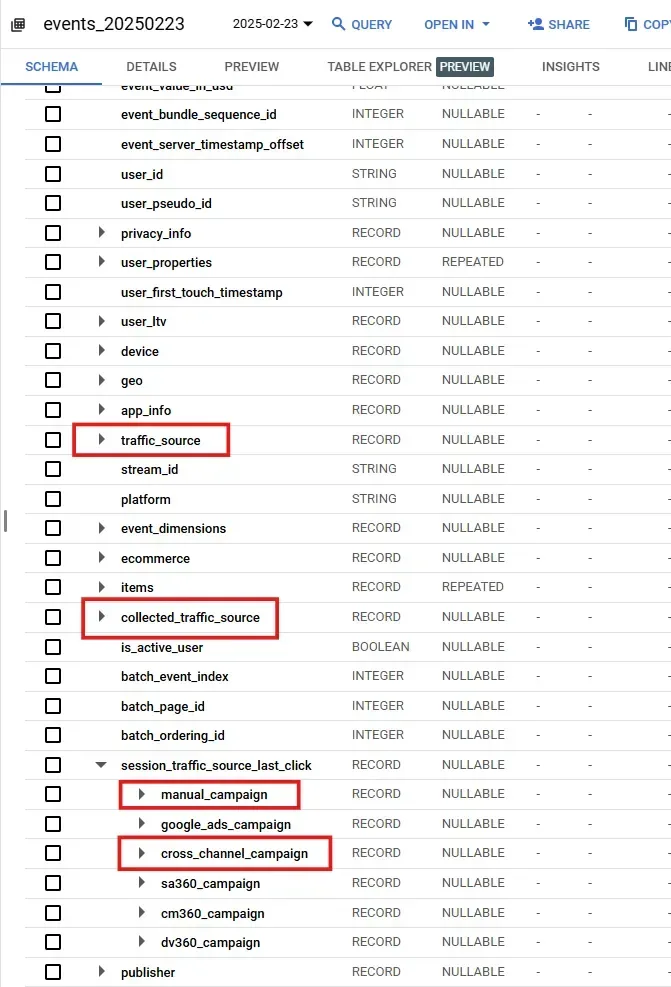
Here is a summary of these four records and their value persistency:
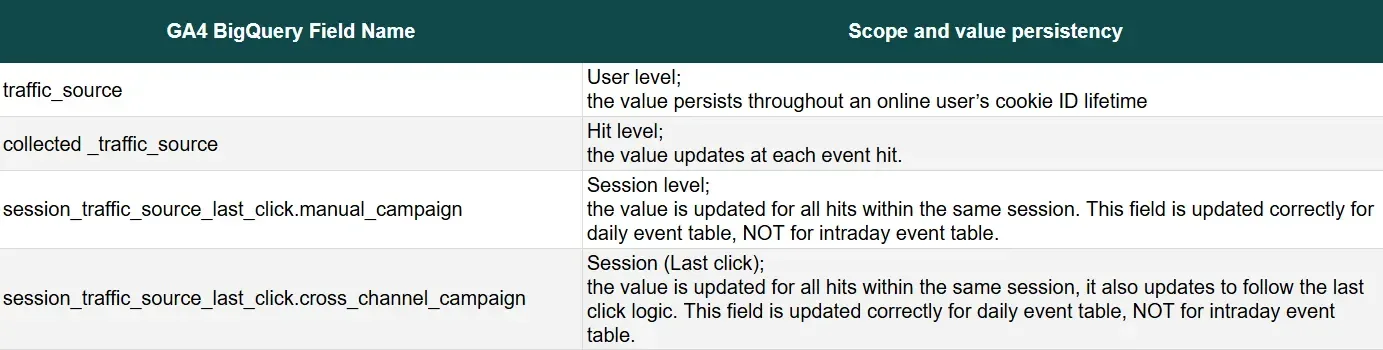
In the next three sections, we are going to go through these fields in further detail.
User level traffic source
The three fields under ‘traffic_source’ store user level traffic source data:
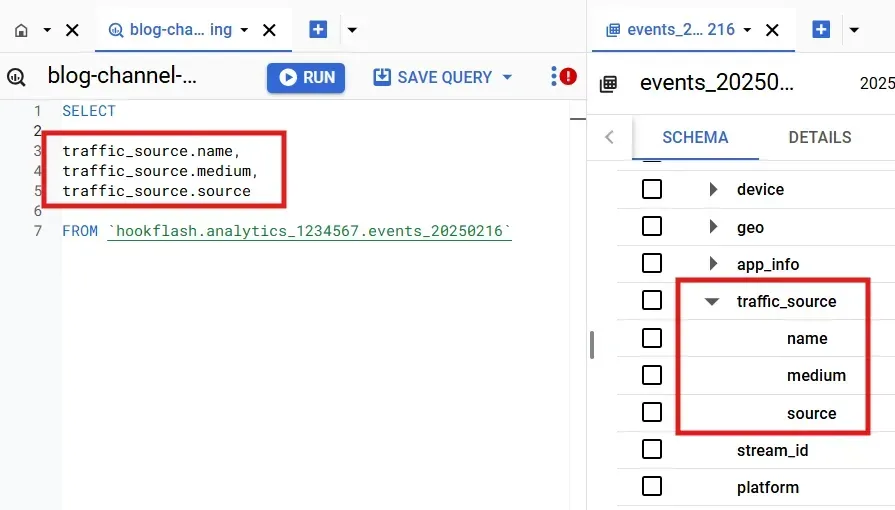
A common mistake a lot of GA4 BigQuery users make in the beginning is that they naturally use traffic_source fields to query source, medium and campaign values. It is important to highlight that these are user level traffic source. As mentioned in my previous article , user level campaign name, source and medium are collected from the url when a new user first landed on the site. These values are assigned to first_visit event, and will persist throughout a user’s lifetime on your website, as long as the user_pseudo_id retains.
You will only use these fields in your query if you are analysing user acquisition, NOT when you analyse session or conversion channel attribution.
Hit level traffic source
The fields under ‘collected_traffic_source’ contain a lot more traffic source information, these are collected at every single hit base on the URL each event is tied to.
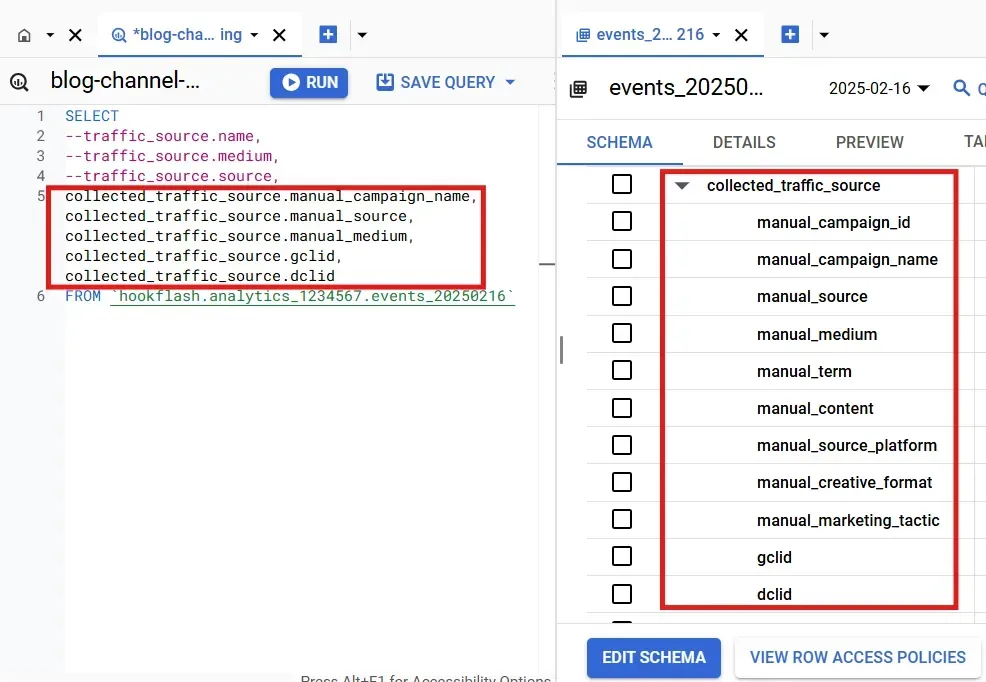
As you can see, on top of the traditional utm fields, there are other query strings used by ads platforms such as ‘gclid’.
The values of these fields are assigned from the URL if the corresponding query parametres are available with that event hit, which means two things:
1) most of the events do not get these values.
In below example, not all events in each session contain the campaign name, source and medium values because these query parametres don’t exist in the URLs when, for example, a scroll event happens:
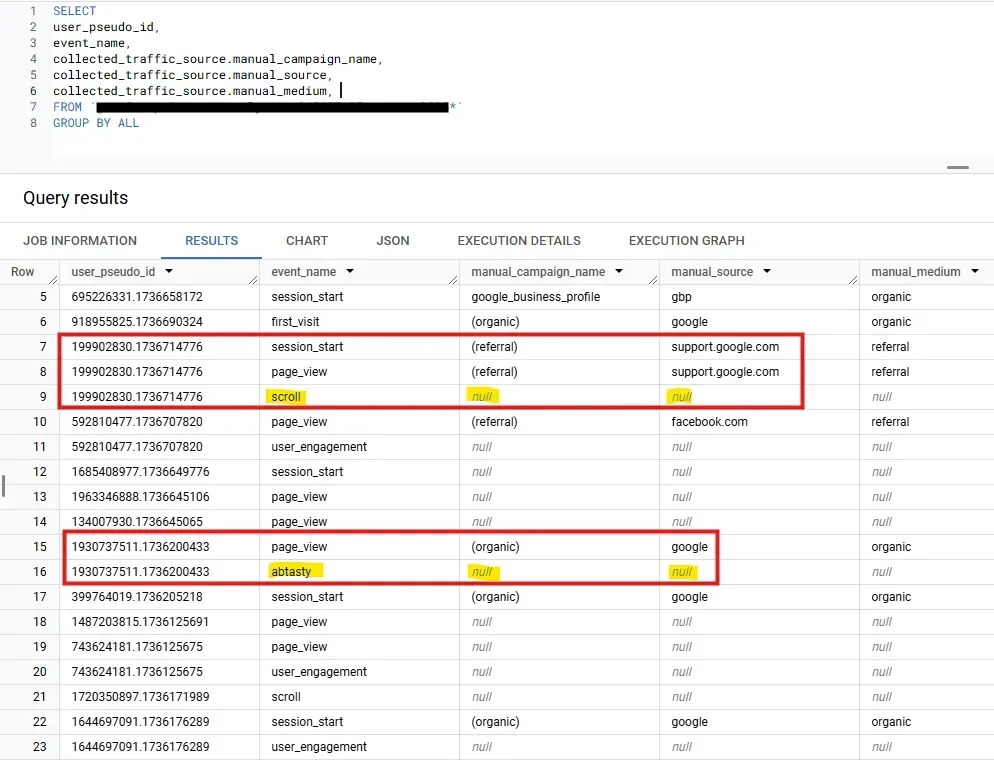
2) if utm values change in the middle of a site visit, that page view event will record the new values in these fields.
Unlike Universal Analytics, GA4 UI does not restart a session if the utm values change in the middle of a session. Therefore, if an online user lands on the site via an organic search, a few minutes later, they click onto an Instagram link to your site, GA4 UI would count only 1 session in this scenario, the session is credited to organic search only. However, if you want to count two sessions under the above scenario, you can use these hit level fields in BigQuery to create session view differently from the UI.
Session level traffic source
The sub-records under ‘session_traffic_source_last_click’ started being added to GA4’s event tables from July 2024. The values under these records are updated for all hits within the same session, some of these records are gathered via connecting with third party platforms such as SA360. These additions make campaign analysis much easier and more flexible for paid search ads.
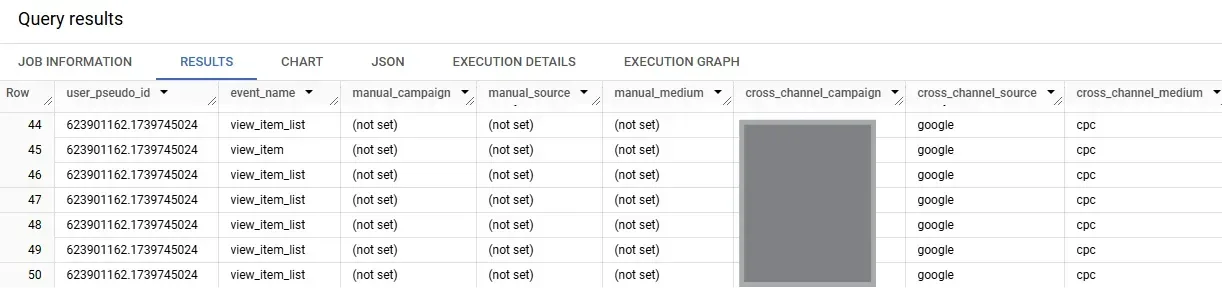
The difference between these two sets is that the manual_campaign updates the values only based on the current session, but cross_channel_campaign updates the values based on last non-direct model (last non-direct model is explained in this article ).
For most sessions, these two sets of fields have the same value, however, when a session has no source, medium and campaign values, the cross_channel_campaign fields look back to the previous session, and pass on the last UTM values into these fields. Here we found an example when this happened:
An important correction by cross channel fields
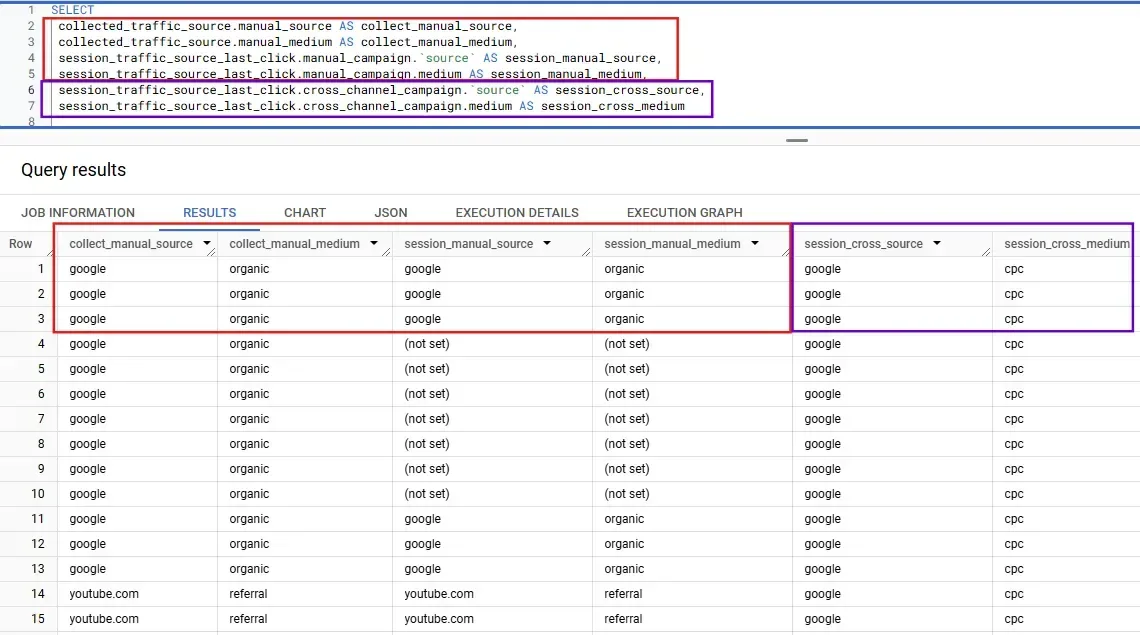
BigQuery traffic fields have an known error: the source/medium values are incorrectly assigned as ‘google/organic’ for paid search traffic when auto tagging is switched on in Google Ads. This is because auto tagged links have no utm query parameters, instead, there is only a ‘gclid’ parameter in the url, therefore BigQuery could not get correct values from the URL.
However, the latest last click session_traffic_source_last_click.cross_channel_campaign fields have fixed this issue, it is now passing on the correct values:
Try it yourself
The best way of understanding how these fields work is to try it yourself. Get in touch if you want the query for you to kick off your own exploration. You can use this to compare these outputs for your consented events grouped by each session. If you have any questions, contact us !
GA4’s BigQuery export offers powerful flexibility for traffic source analysis beyond the GA4 UI. By understanding how different fields capture user, session, and hit-level data, you can create more tailored attribution models.
Whether you need to refine session definitions, improve campaign analysis, or leveraging raw data to build advanced machine learning models, BigQuery provides the foundation to do so. If you need expert guidance in using BigQuery for GA4 channel data modelling, reach out to Hookflash—we’re here to help you get the most from your raw data.
You may also be interested in

Stop Overcounting Product Revenue: Adobe Analytics Adds a Product Level Segment Scope
Read more about Stop Overcounting Product Revenue: Adobe Analytics Adds a Product Level Segment Scope
Why CRO Needs a Human-Centred Approach in the Age of AI
As AI continues to shape how websites are built and optimised, Conversion Rate Optimisation (CRO) is becoming increasingly standardised. We advocate for putting the customer, and human, first.